Let me paint you a picture. It’s 2024, and every productivity YouTuber on the planet is telling me I need a standing desk. “It’ll change your life,” they say, filming from home offices the size of my entire apartment. Standing desks are great. I genuinely believe that. But you know what’s also great? Having room to walk to my kitchen without doing a side shuffle past a 60-inch motorized desk frame that cost more than my first car.
I live in a 400-square-foot apartment in Chicago. My “home office” is a 48-inch desk wedged between my bed and a bookshelf that doubles as a pantry. A full standing desk was never going to happen here. Not unless I wanted to sleep standing up too, which — honestly, some weeks during deadline season, I’ve considered.
So I went down the standing desk converter rabbit hole instead. These are the units that sit on top of your existing desk and raise your keyboard and monitor to standing height. They don’t replace your desk. They don’t require assembly that takes a weekend and a relationship. They just… work. Mostly.
I tested five of the most popular models over the past three months, specifically evaluating them for small-space living. Not from a lab. From my actual apartment, where “small space” isn’t a marketing category — it’s a lifestyle.
On this page
- Quick Verdict: 5 Standing Desk Converters Compared
- Individual Reviews
- Standing Desk Converter vs Full Standing Desk: When Each Makes Sense
- The Anti-Fatigue Mat Nobody Tells You About
- My Recommendation by Situation
- Frequently Asked Questions
- How much desk space does a standing desk converter actually take up?
- Are standing desk converters stable enough for video calls?
- Can I use a monitor arm with a desk converter?
- How long should I stand per day as a beginner?
- Is a $109 converter worth it, or should I save up?
- Will a converter damage my existing desk?
Quick Verdict: 5 Standing Desk Converters Compared
| Converter | Price (approx.) | Footprint (W x D) | Max Height | Weight Capacity | Best For | My Rating |
|---|---|---|---|---|---|---|
| FlexiSpot M7B | $299 | 28.4″ x 16.3″ | 19.7″ | 35 lbs | Overall pick for small spaces | 9/10 |
| VIVO 32″ | $139 | 31.5″ x 22.2″ | 16.5″ | 33 lbs | Budget pick | 7.5/10 |
| Ergotron WorkFit-T | $379 | 35″ x 23″ | 15″ | 40 lbs | Dual monitor setups | 8/10 |
| Fezibo 32″ | $109 | 31.5″ x 22″ | 16.3″ | 33 lbs | Absolute cheapest option | 6.5/10 |
| UPLIFT E7 Desktop Riser | $249 | 26″ x 15.5″ | 18.5″ | 30 lbs | Compact desk, single monitor | 8.5/10 |
If you’re in a rush: the FlexiSpot M7B won. It has the best balance of compact footprint, smooth adjustment, and stability. If your budget is tighter, the VIVO 32″ is genuinely solid for the price. Now let me tell you why, and where each one falls short.
Individual Reviews
FlexiSpot M7B — The One That Actually Fits
Price: ~$299 | Footprint: 28.4″ x 16.3″ | Rating: 9/10
This is the converter I kept on my desk after testing was done. That should tell you something.
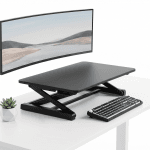
The M7B uses a gas-spring mechanism, which means height adjustment is a one-hand squeeze-and-lift situation. No cranking. No electrical cord snaking across your already-cluttered desk. It goes up, it goes down, and it doesn’t wobble when you’re typing an angry email to your landlord about the radiator.
The footprint is the real story here. At 28.4 inches wide and 16.3 inches deep, this thing leaves me actual desk space on either side. I can still have my coffee, a notebook, and my dignity, all at the same time. On a 48-inch desk, that matters enormously.
The keyboard tray sits below the main platform, which means your monitor and keyboard are at ergonomically correct different heights. A lot of cheaper converters skip this, and your wrists pay for it within a week.
The catch: 35-pound weight capacity means a single monitor and a laptop, not dual 27-inch screens. If you’re running a multi-monitor setup, look at the Ergotron below.
What Reddit says:
“I’ve had the M7B for about 8 months in my studio apartment. It’s the only converter I found that didn’t make my 44-inch desk feel completely unusable when lowered.” — u/deskjockey_chi, r/WFH
“Switched from the VIVO to the M7B. Night and day difference in wobble. Worth the extra $160 if you type a lot.” — u/standing_desk_convert, r/standingdesks
VIVO 32″ — The Budget King That Wobbles a Little
Price: ~$139 | Footprint: 31.5″ x 22.2″ | Rating: 7.5/10
The VIVO 32″ is the converter you’ll find in every “best budget” list, and there’s a reason for that. At $139, it does about 80% of what the FlexiSpot does for less than half the price. The gas spring works. The keyboard tray is included. It holds a monitor and a laptop without complaint.
But let’s talk about the 20% it doesn’t do.
First: the footprint. At 31.5 by 22.2 inches, it’s noticeably deeper than the FlexiSpot. On my desk, it pushed right up against the wall when lowered, and I had to angle my monitor slightly to avoid it literally touching the window blinds. If your desk is against a wall — and in a small apartment, of course it is — measure twice.
Second: wobble. At full height, the VIVO has a gentle sway when you’re typing with any force. It’s not catastrophic. Your coffee won’t spill. But if you’re a heavy typist or you get animated on video calls (guilty), you’ll notice your monitor doing a subtle dance.
The catch: That 22.2-inch depth is a deal-breaker on desks under 24 inches deep. Check your desk depth before ordering.
What Reddit says:
“For $139 I honestly can’t complain. Is it perfect? No. Does it let me stand while working without spending rent money? Yes.” — u/budget_wfh_life, r/ApartmentLiving
“The wobble is real but manageable. I put a folded mousepad under the back feet and it helped like 60%.” — u/ergo_on_a_budget, r/standingdesks
Ergotron WorkFit-T — The Tank
Price: ~$379 | Footprint: 35″ x 23″ | Rating: 8/10
The Ergotron is the odd one on this list because it’s not really designed for small spaces. I’m including it because if you have a wider desk (52 inches or more) and need dual monitor support, nothing else here competes on stability.
This thing is a slab. At 40 pounds of weight capacity and a steel-reinforced frame, it doesn’t wobble. At all. I had a 27-inch monitor and a 24-inch secondary on it simultaneously, and it felt like they were bolted to the earth. The constant-force lift technology means it glides up and down with one finger regardless of how much weight is on it.
The problem, obviously, is size. At 35 inches wide and 23 inches deep, it dominated my desk like a small aircraft carrier. I had to remove my desk lamp, my plant (RIP Herbert), and any illusion that I had “decor.” For the two weeks I tested it, my apartment looked like a standing desk had moved in and I was just the roommate.
The catch: At $379, it’s the most expensive option here, and it simply won’t work on desks under 48 inches wide without hanging over the edge. This is a big-desk converter in a small-desk world.
What Reddit says:
“If stability is your #1 priority, Ergotron is the answer. I’ve had mine for 2 years and it still feels brand new. Zero wobble even at max height.” — u/ergotron_evangelist, r/homeoffice
“Bought this for my 60-inch desk and it’s perfect. Would NOT recommend for anything smaller. It’s genuinely huge.” — u/wfh_since_2020, r/WFH
Fezibo 32″ — The Amazon Impulse Buy
Price: ~$109 | Footprint: 31.5″ x 22″ | Rating: 6.5/10
I’ll be honest: I ordered the Fezibo because it was $109 and I was curious how cheap you could go before things fell apart. The answer is: this is approximately the floor.
It works. The gas spring lifts. The keyboard tray exists. It holds a monitor. But everything feels about one quality tier below the VIVO, which is already the budget option. The surface has a slightly hollow feel. The keyboard tray is narrow enough that a full-size keyboard fits with maybe an inch to spare on each side. The height adjustment has a subtle crunch at certain positions that doesn’t inspire confidence.
That said, if you’re a student in a dorm room and you have $109 and a dream of not hunching over a laptop for four years, this gets the job done. I’m not going to pretend that the difference between $109 and $299 doesn’t matter. It matters a lot when you’re picking between a desk converter and groceries.
The catch: Build quality is noticeably cheaper. If you plan to adjust height multiple times a day, the mechanism will likely feel loose within a year based on what I’ve seen in long-term reviews.
What Reddit says:
“Got the Fezibo for my dorm. It’s fine. It’s not amazing. It cost less than my textbook so I’m not complaining.” — u/college_ergo, r/standingdesks
“Lasted me about 14 months before the gas spring started drooping on one side. You get what you pay for, but I got 14 months of standing out of $109 so whatever.” — u/cheap_desk_guy, r/ApartmentLiving
UPLIFT E7 Desktop Riser — The Sleeper Pick
Price: ~$249 | Footprint: 26″ x 15.5″ | Rating: 8.5/10
The UPLIFT E7 Desktop Riser doesn’t get the hype that FlexiSpot and VIVO get, and I genuinely don’t understand why. This thing has the smallest footprint of anything I tested — 26 inches wide by 15.5 inches deep — and it’s rock solid.
UPLIFT is known for their full standing desks (which are excellent, if you have the space — see our ultimate productivity desk setup guide for more on those). The E7 Riser brings that same build-quality obsession to the converter format. The pneumatic lift is smooth. The surface material doesn’t feel like it came from a folding table. The whole unit weighs under 25 pounds, so repositioning it or storing it in a closet is realistic.
The trade-off is workspace. At 26 inches wide, you’re fitting one monitor and a keyboard. That’s it. No second screen. No sprawling notebook. This is a focused, single-task workstation, and if that’s what you need, it’s outstanding.
The catch: 30-pound weight capacity is the lowest here. Heavy monitors or monitor arms that clamp to the platform are a no-go.
What Reddit says:
“The UPLIFT riser is slept on. I have a 42-inch desk in my apartment and it’s the only converter that left me room for anything else.” — u/tiny_desk_tiny_life, r/WFH
“Build quality is miles ahead of the VIVO and Fezibo at this price point. Feels like a premium product.” — u/ergo_nerd_2025, r/homeoffice
Standing Desk Converter vs Full Standing Desk: When Each Makes Sense
I get this question a lot, so let me break it down simply.
Get a converter if:
- Your desk is under 55 inches wide and you can’t replace it (rental furniture, built-in desk, dorm)
- You share a desk with someone who prefers sitting (couples WFH-ing at the same desk — I see you, and I’m sorry)
- Your budget is under $300
- You move frequently and don’t want to disassemble a desk frame every 12 months
- You want to try standing before committing to a full setup
Get a full standing desk if:
- You have a dedicated office space (even a corner) with at least 48 x 30 inches of floor space
- You use dual monitors and need a wide, stable surface
- You want programmable height presets (sit/stand transitions at the push of a button)
- You plan to stay in your current space for 2+ years
Full standing desks have gotten shockingly affordable — the UPLIFT V2 and FlexiSpot E7 are both under $500 now. But they require floor space and commitment that a converter simply doesn’t. If you’re renting a 400-square-foot apartment and you might move next year, a converter is the pragmatic choice. Check out our remote work tech essentials guide for the complete WFH setup breakdown.
The Anti-Fatigue Mat Nobody Tells You About
Here’s something I wish someone had told me before I spent my first week standing on hardwood floors in socks like an absolute fool: you need an anti-fatigue mat.
Not a yoga mat. Not a folded towel. An actual anti-fatigue mat.
Standing for 2-4 hours a day on a hard surface will destroy your feet, your knees, and your enthusiasm for standing desks within about 72 hours. I went from “this is revolutionary” to “my heels are staging a revolt” in three days.
The Topo by Ergodriven (~$119) is the one I use. It has terrain features — raised edges, a massage mound in the center — that encourage you to shift your feet throughout the day. It sounds gimmicky until you realize you’ve been unconsciously fidgeting with it for an hour and your legs feel fine.
Budget pick: the CumulusPro Commercial Mat (~$47) is flat but genuinely thick and supportive. It won’t encourage movement the way the Topo does, but it’ll keep your joints from filing a formal complaint.
One more thing: if you’re in a small apartment, get a mat you can slide under your desk or stand vertically against a wall. The Topo is 29 x 26.5 inches and slides under my desk with about a half-inch to spare. Plan for storage, because a mat living permanently in the middle of your apartment floor is a tripping hazard and an aesthetic disaster.
My Recommendation by Situation
Tiny desk (under 45 inches wide): UPLIFT E7 Desktop Riser. Smallest footprint, solid build. You’ll sacrifice dual-monitor capability, but you’ll actually have desk space left.
Shared desk with a partner: FlexiSpot M7B. Light enough to move on and off the desk easily, and the compact depth means it doesn’t permanently dominate the surface when lowered.
Dual monitor setup: Ergotron WorkFit-T. Nothing else here handles two monitors without wobbling. Just make sure your desk is wide enough (52 inches minimum, I’d say).
Strict budget (under $150): VIVO 32″. It wobbles slightly and it’s deeper than I’d like, but for $139, the value is genuinely hard to beat. The Fezibo saves you another $30, but the quality drop is noticeable.
Best overall for small-space living: FlexiSpot M7B. It won for a reason. Compact, stable, well-built, and $299 is reasonable for something you’ll use every workday.
For the rest of your ergonomic setup — because a converter alone won’t save your back — take a look at our best ergonomic chairs for programmers roundup. Your spine will thank you.
Frequently Asked Questions
How much desk space does a standing desk converter actually take up?
When lowered, converters sit 4-6 inches tall and cover their full footprint on your desk. The FlexiSpot M7B takes up about 28 x 16 inches — roughly the space of a large laptop. The bigger models (Ergotron, VIVO) consume 31-35 inches of width. Always measure your desk and the wall clearance behind it before buying.
Are standing desk converters stable enough for video calls?
The FlexiSpot M7B, UPLIFT E7, and Ergotron WorkFit-T are all stable enough that your webcam won’t noticeably shake during normal use. The VIVO and Fezibo have mild wobble at full height that can be visible on camera if you type aggressively. A quick fix: lower the height by one inch from maximum. Most wobble happens at the very top of the range.
Can I use a monitor arm with a desk converter?
Technically yes, but I’d only recommend it with the Ergotron WorkFit-T, which has the surface area and weight capacity to handle a clamp-on arm. With the smaller converters, a monitor arm adds instability and eats into your already-limited weight budget. A simple monitor stand or a laptop riser is a better pairing for compact converters.
How long should I stand per day as a beginner?
Start with 30-minute blocks, 2-3 times per day, and alternate with sitting. The common mistake is going all-in on day one, standing for six hours, and then swearing off standing desks forever because your feet hate you. Build up over 2-3 weeks. Most ergonomics researchers suggest a roughly 1:1 or 1:2 standing-to-sitting ratio once you’re adapted.
Is a $109 converter worth it, or should I save up?
If $109 is your budget right now, the Fezibo will let you stand while working, and that’s better than not standing at all. But if you can stretch to $139, the VIVO is meaningfully better built. And if you can wait and save to $249-299, the UPLIFT E7 or FlexiSpot M7B will last years longer and feel better every single day. Think of it as cost-per-stand. At one stand per workday over two years, even the $299 FlexiSpot works out to about 60 cents a day.
Will a converter damage my existing desk?
Most converters have rubber or foam pads on the bottom to protect your desk surface. I didn’t see any scratches or dents on my desk after three months of testing. That said, if you have a glass desk or a particularly delicate surface, put a thin shelf liner underneath for extra protection. The weight of a loaded converter (unit plus monitor plus keyboard) can be 50-60 pounds concentrated on four small feet.
Last updated: April 15, 2026. Prices reflect approximate retail pricing at the time of publication and may vary. I purchased all five converters with my own money for this review. If you found this helpful, check out our complete remote work setup guide and our 2026 desk setup roundup for more small-space WFH solutions.