I have owned fourteen mechanical keyboards. Not because I needed fourteen keyboards — nobody needs fourteen keyboards — but because I kept buying the wrong switches. My first board had Cherry MX Blues. Fantastic for about twenty minutes, until my roommate threatened to move out. Then Cherry MX Reds, which felt like typing on a wet bar of soap. Then Browns, which Reddit told me were “the perfect compromise” and which turned out to be a compromise in the way that gas station sushi is a compromise between hunger and food poisoning.
That sent me down a rabbit hole. I walked into a keyboard meetup in Portland where people discussed “spring weights” and “actuation curves” with the intensity of sommeliers debating terroir. I have since tested over 30 switch types across eight keyboards, talked to mechanical keyboard designers, and read enough r/MechanicalKeyboards threads to earn a PhD in switch snobbery. The problem is not that good switches do not exist — it is that most guides assume you already understand actuation force, travel distance, and tactile bump, which are exactly the things you are trying to learn.
This guide starts from zero. By the end, you will know enough to pick a switch without spending $200 on a keyboard you will hate. For specific board recommendations, see our best mechanical keyboards for programming guide. This article is about the switches themselves.
On this page
- The 30-Second Version
- Linear Switches: The Smooth Operators
- Tactile Switches: The Programmer’s Choice
- Clicky Switches: The Love-or-Hate Option
- The Specs That Actually Matter
- Brand Comparison: Cherry vs Gateron vs Kailh vs Everything Else
- Optical and Hall Effect: The New Kids
- What Reddit Gets Wrong About Switches
- The Switch Test Strategy That Saves Money
- How to Choose Without Going Insane
- My Personal Picks After 14 Keyboards
- FAQ
- Are Cherry MX switches still worth buying?
- Do I need to lube my switches?
- What is the deal with Cherry MX Brown hate?
- Optical vs mechanical — which is actually better?
- Can I try switches before buying a keyboard?
- Do switches affect typing speed?
- How long do mechanical switches last?
- What about low-profile mechanical switches?
The 30-Second Version
| Switch Type | Feel | Sound | Best For | Popular Options |
|---|---|---|---|---|
| Linear | Smooth, no bump | Quiet to moderate | Gaming, fast typing, shared offices | Cherry MX Red, Gateron Yellow, Gateron Oil King |
| Tactile | Noticeable bump at actuation | Moderate | Programming, writing, general productivity | Cherry MX Brown, Gateron Brown, Holy Panda, Boba U4T |
| Clicky | Sharp bump + audible click | Loud | Typists who work alone, people who love sound | Cherry MX Blue, Kailh Box White, Kailh Box Jade |
That is genuinely it. Every mechanical switch is one of these three types. Everything else — brand, color, material, spring weight — is refinement within these categories. Pick a type from this table and you are 80% of the way to the right choice.
Linear Switches: The Smooth Operators
A linear switch goes straight down with no bump, no click, and no feedback. You press, the key registers, you release. The motion is smooth from top to bottom — like pressing a piston into a tube of butter.
Who they are for: Gamers who want fast key presses without resistance. Typists who prefer a quiet, smooth keystroke. People who type lightly and do not need physical feedback to know a key registered.
Who they are not for: Hunt-and-peck typists who need to feel when a key activates. People who accidentally press keys because there is no resistance to stop them. Anyone who benefits from tactile certainty.
“I switched from Blue switches to Gateron Yellows and my coworkers stopped giving me death stares. My typing speed actually went up too — the smooth travel lets me type faster.” — r/MechanicalKeyboards
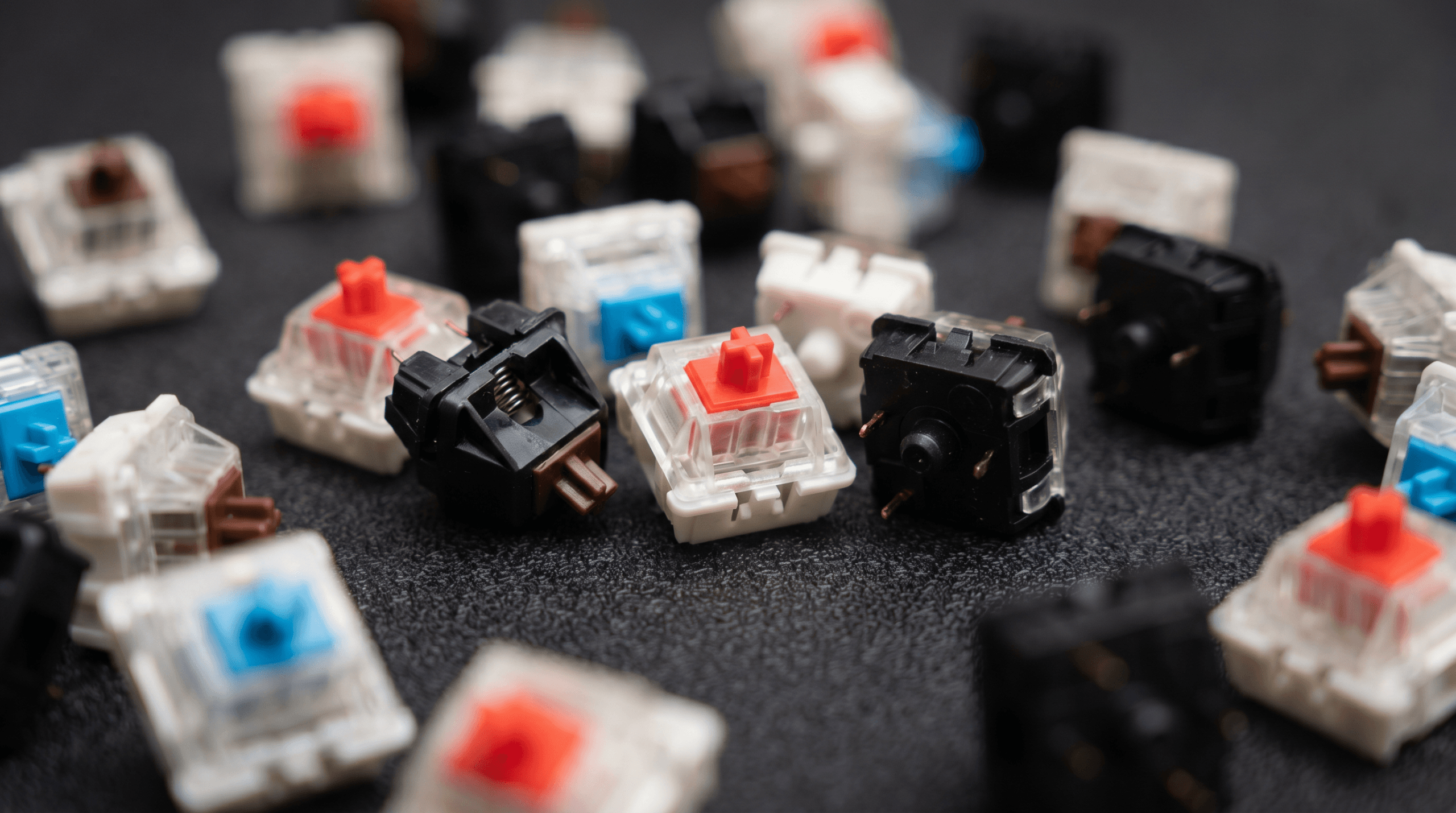
Popular examples: Cherry MX Red (45g, light), Cherry MX Black (60g, heavy), Gateron Yellow (50g, medium — widely considered the best budget linear), Gateron Oil King (55g, pre-lubed). For programming where precision matters, I prefer 50-55g. For gaming where speed matters, 45g.
Tactile Switches: The Programmer’s Choice
A tactile switch has a small bump in the middle of the keypress — you feel a slight resistance, then the key drops past the actuation point. It is physical confirmation that the key registered, without the noise of a clicky switch.
Who they are for: Typists who want to feel each keypress without hearing it. Programmers who spend 8+ hours typing and want feedback without fatigue. Office workers who cannot use clicky switches without getting murdered.
Who they are not for: People who find the bump distracting. Gamers who rapid-fire keys and do not want anything slowing the press. Anyone who tries Brown switches and thinks “I can barely feel this” — you are probably a clicky person.
“Once you get used to the bump telling you the key registered, going back to linears feels like typing on a greased floor. Tactiles are the sweet spot between feedback and noise.” — r/programming
The bump is information. It tells you “key registered” without requiring you to slam the key to the bottom. Over an 8-hour coding session, this reduces finger fatigue because you can learn to type just past the bump. For anyone who spends long hours at a desk setup typing code, tactiles are the ergonomic choice.
Popular examples: Cherry MX Brown (45g, mild bump — controversial), Gateron Brown (same idea, smoother), Holy Panda (67g, pronounced bump), Boba U4 (62g, silent tactile, excellent for offices), Boba U4T (62g, pronounced bump with deep “thock” sound).
Clicky Switches: The Love-or-Hate Option
A clicky switch has both a tactile bump and an audible click when the key actuates. The sound comes from a physical click mechanism — either a click jacket (Cherry-style) or a click bar (Kailh Box-style). Think vintage typewriter meets ASMR keyboard video.
Who they are for: People who genuinely enjoy the sound and use it as typing feedback. Writers and typists who work alone or in private offices.
Who they are not for: Anyone who shares a workspace. Video call participants (your microphone will pick it up). People who type late at night near sleeping humans or animals. Literally anyone in an open office.
“I brought a board with Box Jades to the office once. Once. My manager had a conversation with me within the hour that I would describe as ‘polite but firm.’ I now use Boba U4s at work and keep the Jades at home.” — u/clickclack_regret, r/MechanicalKeyboards
Popular examples: Cherry MX Blue (50g, classic click jacket), Kailh Box White (50g, cleaner click bar mechanism), Kailh Box Jade (50g, heavy click bar — the loudest switch you can buy without building one yourself).
The Specs That Actually Matter
| Spec | What It Means | Why You Care |
|---|---|---|
| Actuation force | Grams of force to register a keypress | Lower = lighter typing, higher = more deliberate. 45g is standard; below 40g causes accidental presses; above 60g tires your fingers |
| Actuation point | Distance (mm) where the keypress registers | Shorter = faster registration (gaming); longer = more control (typing). Standard is 2.0mm |
| Total travel | Full distance the key moves from top to bottom | Standard is 4.0mm. Shorter travel (3.2-3.6mm) feels snappier; longer travel feels more deliberate |
| Bottom-out force | Force needed to push the key all the way down | If you are a heavy typist who bottoms out every key, this matters more than actuation force |
Light typists should focus on actuation force. Heavy typists who slam keys to the bottom should focus on bottom-out force. Gamers should look at actuation point. Most people — including me — should try a few switches and stop overthinking the numbers.
Brand Comparison: Cherry vs Gateron vs Kailh vs Everything Else
Cherry MX. Cherry invented the modern mechanical switch and held a patent monopoly until 2014. Their switches are the industry standard — every other brand uses Cherry’s color naming convention. Cherry switches are consistent, reliable, and well-documented. They are also no longer the best in most categories. Since the patent expired, competitors like Gateron have matched Cherry’s quality at lower prices while offering smoother keystrokes out of the box. In 2026, Cherry has caught up with their “Cherry 2.0” lineup, but you are often still paying a brand tax.
Gateron. The brand r/MechanicalKeyboards recommends most often. Their switches are smoother than Cherry equivalents, cost 30-50% less, and come in a wider variety. The Gateron Yellow has become something of a legend — smooth, cheap, and satisfying without any modification. Premium options like Gateron Oil King and Gateron CJ compete with boutique brands at half the price.
Kailh. Two lines: standard Kailh (cheap, inconsistent — avoid) and Kailh Box (excellent). The Box design adds a box-shaped housing around the stem that prevents dust ingress and improves stability. Kailh Box switches are the best clicky switches available — the click bar in Box White and Box Jade produces a crisper sound than Cherry’s click jacket.
Boutique / enthusiast brands. JWK, Durock, Tecsee, and others make premium switches enthusiasts swear by. Holy Panda started as a Frankenswitch and is now manufactured by several brands. These typically cost $0.40-0.80 per switch versus $0.20-0.35 for Cherry or Gateron — noticeable but not always worth double the price.
Akko. The best value brand in 2026 for many buyers. Their CS switches are pre-lubed from factory, have excellent consistency, and cost 30-50% less than equivalent Cherry or Gateron options. The Akko CS Lavender Purple (tactile) and Akko CS Rose Red (linear) are particularly well-regarded on r/BudgetKeebs.
Optical and Hall Effect: The New Kids
Traditional mechanical switches work by physically connecting two metal contacts. Optical switches use a beam of light; Hall Effect switches use magnets. Both eliminate metal contact, which means no debounce delay and no contact degradation over time.
Hall Effect switches are the current hotness for gaming because they support adjustable actuation points — you can set the key to register at 0.1mm or 3.5mm or anywhere in between, per key. The Wooting 60HE popularized this and it is now available from multiple brands.
The trade-off: optical and Hall Effect switches are not compatible with standard mechanical switch sockets. If you buy a keyboard with optical switches, you can only swap in other optical switches from the same brand. The ecosystem is smaller and the resale market is worse.
For most people who type more than they game, traditional mechanical switches are still the better choice. The “optical is faster” claim is technically true but the difference (1-5ms) is imperceptible outside controlled testing. Our how to read tech specs guide covers this kind of spec theater in detail.
What Reddit Gets Wrong About Switches
“Cherry MX Brown is the worst switch ever made.” This is the most repeated opinion on r/MechanicalKeyboards and it is mostly snobbery. MX Brown is a perfectly functional tactile switch with a subtle bump. It is not exciting, but it works well for millions of people. If you try Browns and think “I cannot really feel the bump,” try something with a more pronounced bump like Holy Pandas or Boba U4Ts.
“You need to lube your switches.” Lubing makes a significant difference in smoothness and sound — Krytox 205g0 transforms budget Gateron Yellows. It also requires 2-4 hours of tedious labor for a full keyboard. For enthusiasts, it is a rewarding project. For everyone else, buy pre-lubed switches (Gateron Pro, Akko CS, Gateron Oil King) and call it done.
“Gateron is always better than Cherry.” This was true around 2020-2022 when Cherry’s quality control slipped. In 2026, Cherry has caught up with Cherry 2.0, and Gateron has had some inconsistent batches. Both brands make excellent switches. Do not dismiss Cherry based on outdated Reddit consensus.
“You need a hot-swap keyboard.” Hot-swap PCBs let you change switches without soldering — great if you want to experiment. But if you know you want tactiles and you have tried them before, a soldered keyboard is fine and often has more stable switch connections.
The Switch Test Strategy That Saves Money
Buying a full keyboard to test switches is expensive. Here is the progression I recommend:
- Buy a switch tester. A 9-12 switch sample board costs $15-25 on Amazon. It will not tell you how a switch feels to type on, but it immediately tells you if you hate linears or love clickies. Start here.
- Narrow to a family. Once you know linear, tactile, or clicky, you have eliminated two-thirds of the options. This is the most important decision.
- Buy a hot-swap keyboard. A hot-swappable board lets you pull switches out and push new ones in without soldering. The Keychron V-series or GMMK boards are excellent starting points — see our keyboard guide.
- Buy a single pack of your top candidate. Most switches are sold in packs of 10-36 for $5-15. Install them on your home row and type for a week before committing to a full set.
This approach costs about $50-70 in experimentation before you commit to a $100+ keyboard with the right switches. It is cheaper than buying and returning three keyboards.
How to Choose Without Going Insane
- You primarily program or write long-form: Tactile. Start with Gateron Brown Pro (pre-lubed) if budget is a concern, or Holy Panda / Boba U4T if you want the premium experience.
- You primarily game: Linear. Gateron Yellow is the sweet spot. Cherry MX Red if you want lighter touch.
- You work alone and love sound: Clicky. Kailh Box White for clean clicks, Box Jade for maximum theatre.
- You are unsure: Tactile. It is the most versatile type — the “safe” choice in the best way.
- You share a space with anyone: Linear or tactile. Never clicky. Your relationships are more important than your typing experience.
My Personal Picks After 14 Keyboards
Best linear: Gateron Oil King. Pre-lubed, deep sound, 55g actuation heavy enough to prevent accidental presses but light enough for long sessions.
Best tactile: Boba U4T. A 62g tactile with a sharp, pronounced bump and a deep “thock” sound. The silent version (Boba U4, without the T) is equally good for offices.
Best clicky: Kailh Box White. Clean click, no mushiness, and the box design prevents stem wobble. If your housemates have agreed in writing, this is the one.
Best budget: Gateron Yellow. Smooth, cheap, well-documented, and a genuine contender against switches that cost three times as much. Lube them with Krytox 205g0 and they compete with anything under $0.60/switch.
FAQ
Are Cherry MX switches still worth buying?
For most people, no — Gateron equivalents are smoother and cheaper. Cherry MX is still the safest choice if you want proven reliability and do not plan to modify switches. But the value proposition has shifted heavily toward Gateron, Akko, and JWK.
Do I need to lube my switches?
You do not need to, but lubing makes a significant difference in smoothness and sound. It reduces scratchiness, dampens spring ping, and creates a more consistent keystroke. Budget 3-4 hours for a full keyboard. Or buy pre-lubed switches and skip the labor.
What is the deal with Cherry MX Brown hate?
The MX Brown has the lightest tactile bump of any tactile switch — so light that many people can barely feel it. Enthusiasts call it “a linear with sand in it.” It is not a bad switch; it is just not tactile enough for people who chose tactile for feedback, and not smooth enough for people who would be happier with a linear.
Optical vs mechanical — which is actually better?
For competitive gaming where milliseconds matter: optical or Hall Effect, due to zero debounce and adjustable actuation. For everything else: mechanical, due to vastly larger switch selection, hot-swap compatibility across brands, and mature aftermarket. The speed difference is imperceptible to humans outside controlled testing.
Can I try switches before buying a keyboard?
Yes. Buy a switch tester — a small board with 8-12 different switches mounted for comparison. They are $15-30 on Amazon. This is the single best investment before committing to a $150 keyboard.
Do switches affect typing speed?
Slightly. Experienced typists are fastest on linear switches, but the difference is 3-5 WPM at most. Comfort over long sessions matters more than raw speed. Pick the switch that feels best and your speed will optimize over a few weeks.
How long do mechanical switches last?
Most are rated for 50-100 million keypresses. At 10,000 keypresses per day (heavy programming), that is 13-27 years. You will replace the keyboard for other reasons before the switches die.
What about low-profile mechanical switches?
Low-profile switches (Cherry MX Low Profile, Gateron Low Profile, Kailh Choc) have shorter key travel — about 3mm vs 4mm standard. Good for portability and desk ergonomics, but the typing feel is less satisfying than full-travel switches.
Ethan Caldwell has owned more mechanical keyboards than any reasonable person should. He reviews gear for people who carry their office with them at WU120 Tech Insights.