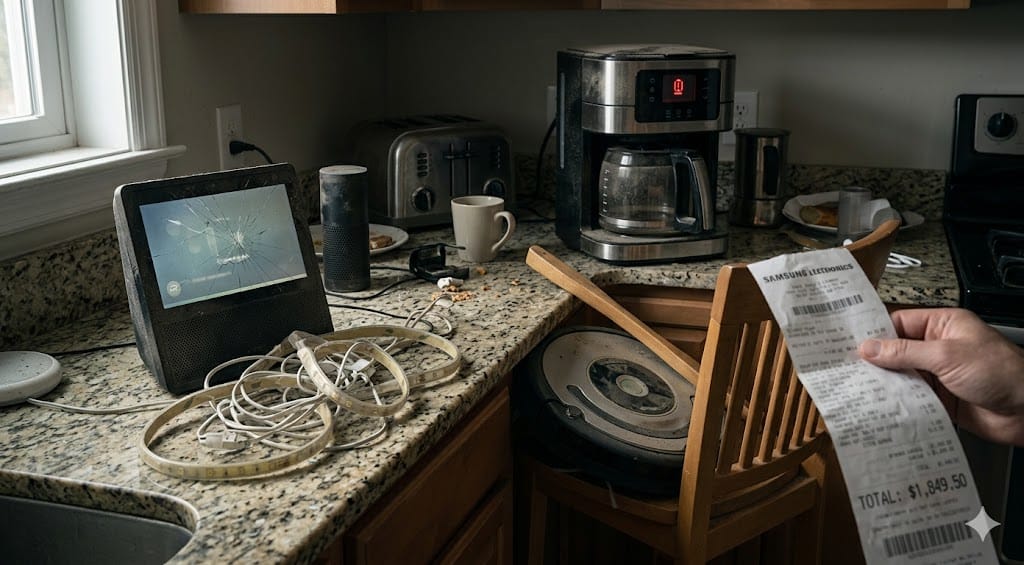
I’m going to tell you how a grown man with a decent salary and supposedly decent judgment lit two thousand dollars on fire over eighteen months. Not literally—that would’ve at least been warm. No, I spent it on “smart” home devices: gadgets that promised to turn my apartment into a frictionless temple of automation. Lights that know your mood. A fridge that reminds you to buy milk. Curtains that open themselves like you’re a Bond villain waking up in a penthouse.
The reality? A closet full of plastic rectangles with dead firmware. A robot vacuum that ate my dog’s leash and drove itself into a wall so hard it cracked the bumper. A “smart” lock that locked me out during a Wi-Fi outage. A curtain motor that sounds like a dentist’s drill at 6:47 every morning because I can’t figure out how to delete the automation.
Here’s my confession, my cautionary tale, and hopefully the article that saves you from the same expensive mistakes. If you’ve been reading about overhyped tech this year, consider this the personal damage report.
Contents
- 1 The Graveyard of Smart Devices in My Closet
- 2 6 Smart Home Product Categories to Avoid in 2026
- 3 The Damage Report
- 4 What Actually Works: The Short List That Earned Its Place
- 5 The Ecosystem Lock-In Trap
- 6 Frequently Asked Questions
- 6.1 Are ALL smart home devices a waste of money?
- 6.2 What’s the single best smart home purchase for a beginner?
- 6.3 Is a smart fridge ever worth it?
- 6.4 Should I wait for Matter to mature before buying smart home devices?
- 6.5 How do I avoid ecosystem lock-in?
- 6.6 How much should I budget for a smart home that actually works?
The Graveyard of Smart Devices in My Closet
Before we get into categories, let me just inventory the carnage. Sitting in a shoebox labeled “REGRET” in my hall closet right now:
- One Samsung smart fridge panel (replaced the whole fridge after the screen died—kept the fridge, ditched the “smart”)
- Two off-brand robot vacuums, one missing a wheel
- A Wi-Fi smart lock with no physical key backup (yes, really)
- An automatic pet feeder that dispensed an entire day’s food at 3 AM
- Motorized curtain rods for two windows
- Three first-gen voice-only smart speakers that now serve as expensive paperweights
Total estimated spend: $2,147. Total current value: regret and maybe $40 on Facebook Marketplace.
Let’s break down why each category is a trap.
6 Smart Home Product Categories to Avoid in 2026
1. Smart Fridges
Why it seems like a good idea: A touchscreen on your fridge! See inside without opening the door! It’s been the CES centerpiece since 2016. Every year they add more features—meal planning, streaming, family calendars. The marketing photos show a gleaming stainless surface displaying recipes while a photogenic family laughs in the background.
Why it fails in practice: Smart fridges cost $800–$2,000 more than their “dumb” equivalents, and the smart features age out fast. The screen runs a stripped-down OS that stops getting updates within two years, while the fridge itself should last a decade-plus. You’re paying a premium for a tablet glued to an appliance. The internal cameras are terrible—grainy, poorly lit, and angled so you can see roughly 30% of your shelves. The “food tracking” feature requires manual logging, which nobody does past week two. And when the screen breaks? Good luck finding a replacement panel for a three-year-old model.
“My Samsung Family Hub screen died 14 months in. Samsung wanted $900 to fix it. The fridge part works fine. I now have a $3,200 fridge with a black rectangle on the door.” — u/ColdStorageSurvivor, r/smarthome
“I logged groceries in my smart fridge for exactly 11 days. Then I stopped. Everyone stops. Buy a whiteboard magnet.” — u/fridge_regret_2025, r/homeautomation
The verdict: Buy the best non-smart fridge you can afford. Stick a $10 magnetic whiteboard on it for your grocery list. You’ll save over a thousand dollars and gain zero regrets.
2. Wi-Fi-Only Smart Locks (No Local Backup)
Why it seems like a good idea: Unlock your door with your phone! Give temporary codes to guests! See who’s coming and going! Never carry keys again!
Why it fails in practice: Any smart lock relying solely on Wi-Fi with no local fallback—no physical keyhole, no Bluetooth, no Z-Wave or Zigbee mesh—is a security liability cosplaying as convenience. Wi-Fi goes down, router reboots, ISP has an outage at 11 PM on a Tuesday, and you’re locked out of your own home. Battery drain is another killer: Wi-Fi radios are power-hungry, and budget smart locks chew through batteries every 4–8 weeks instead of the 6–12 months you’d get from a Zigbee or Z-Wave lock. I learned all this standing in my hallway in socks, calling my landlord, at an hour I’d rather not disclose.
“Spent 45 minutes locked out during a Comcast outage. My phone was inside. My keys were inside because I stopped carrying them. I was outside in pajamas. Locksmith cost me $150. So my ‘smart’ lock cost me $350 total.” — u/LockedOutLarry, r/smarthome
“Rule #1 of smart locks: if it doesn’t have a physical key slot, it’s not a lock, it’s a gamble.” — u/HomeAutoSec, r/homeautomation
The verdict: If you want a smart lock, get one with a physical key override AND local communication (Zigbee, Z-Wave, or Thread). The Schlage Encode Plus and Yale Assure Lock 2 get this right. Never go Wi-Fi-only. And learn to read the specs before you buy—the protocol matters more than the feature list.
3. Cheap Robot Vacuums Under $200
Why it seems like a good idea: A robot that cleans your floors! For less than $200! The listings on Amazon have five stars and words like “LiDAR navigation” and “smart mapping” plastered everywhere.
Why it fails in practice: Sub-$200 robot vacuums in 2026 are, with rare exceptions, terrible. They use bump-and-wander navigation instead of real mapping—bouncing off furniture like a drunk pinball. They get stuck on every rug edge, charging cable, and stray sock. Dustbins are comically small, usually 200–300 mL, meaning you empty them more often than it would’ve taken to just vacuum yourself. Suction is typically 2,000–3,000 Pa versus the 8,000–12,000 Pa you’d get from mid-range units—enough to redistribute crumbs, not remove them. My budget Yeedi sounded like a blender full of gravel and once wedged itself under my couch so thoroughly I had to tip the furniture over to retrieve it.
“I’ve owned 3 robot vacuums under $200. All three are dead within a year. My Roborock S8 has been running for 2 years without a single issue. Buy once, cry once.” — u/DustBusterVet, r/BuyItForLife
“The cheap ones don’t vacuum. They just push crumbs around your house in a randomized pattern like a Roomba designed by someone who’s never seen a floor.” — u/FloorWarDiary, r/smarthome
The verdict: Save for a Roborock Q Revo, Ecovacs Deebot T30, or Roomba j-series. The $350–$550 range is where robot vacuums stop being toys and start being tools. Below that threshold, you’re donating to your local landfill on a delayed timeline.
4. Smart Pet Feeders
Why it seems like a good idea: Feed your pet on a perfect schedule even when you’re away! Portion control! App notifications! Some models even include cameras so you can watch your cat judge your life choices from another zip code.
Why it fails in practice: Most smart pet feeders have a fatal flaw: mechanical unreliability. Kibble jams the dispenser constantly, especially odd-shaped or slightly large pieces. Portions are wildly inconsistent—the “1/4 cup” setting on mine dispensed anywhere from two tablespoons to half a cup depending on the kibble’s mood. Wi-Fi drops mean missed meals, which isn’t a minor inconvenience when it’s your animal’s nutrition on the line. And the failure mode is genuinely cruel: if it malfunctions while you’re away for a weekend, your pet doesn’t eat.
Mine dumped an entire hopper of food at 3 AM. My cat ate until she threw up, and then ate more. A tiny, furry Roman banquet. She spent the next day in a food coma on the couch, and I spent it cleaning the kitchen floor.
“PetSafe smart feeder jammed on day 4 of a week trip. Came home to a very angry and very hungry cat. Went back to a gravity feeder. Sometimes dumb is better.” — u/CatDadDisaster, r/smarthome
“I don’t trust any device whose failure mode is ‘your animal starves.’ Automatic feeders are a solution looking for a problem. Just feed your pet.” — u/AnalogPetOwner, r/homeautomation
The verdict: If you travel frequently, hire a pet sitter. A gravity feeder handles short absences without electricity, Wi-Fi, or firmware. If you must automate, get a model with local scheduling (not cloud-dependent) and test it extensively—for at least two full weeks—before relying on it while you’re away.
5. Motorized Smart Curtains (Budget Models)
Why it seems like a good idea: Wake up to curtains opening automatically with the sunrise! Close them at night for privacy! It’s the ultimate “living in the future” flex, and every smart home YouTube video includes that slow, dramatic curtain reveal.
Why it fails in practice: Budget smart curtain motors (under $150 per window) are noisy, unreliable, and fiddly to install. Most require specific rod types or tracks. The calibration drifts over time—your “fully open” gradually becomes “80% open with a sad gap on one side.” The motors strain with anything heavier than sheer fabric. And the fundamental problem nobody talks about: opening curtains is a two-second manual task you do twice a day. At $150–$300 per window, I spent $450 on three windows to automate roughly twelve seconds of daily effort. That’s approximately $13,688 per hour of labor saved. I am not a rational consumer.
“Installed SwitchBot curtain motors on 3 windows. One fell off the rod within a week. One makes a grinding noise. One works. $450 for a 33% success rate.” — u/CurtainCallRegret, r/homeautomation
“Smart curtains are the answer to a question literally nobody asked. My arm works fine.” — u/ManualModeForever, r/smarthome
The verdict: Unless you have an accessibility need or floor-to-ceiling windows in a luxury build, skip motorized curtains. Professional-grade systems from Lutron or Hunter Douglas work well but cost $500–$1,200 per window. The budget alternatives aren’t cheaper versions of that experience—they’re a completely different, worse product. If ambiance is the goal, invest in smart lighting instead.
6. Voice-Only Smart Speakers (No Screen)
Why it seems like a good idea: A cheap entry point into smart home control! Play music! Set timers! Ask it the weather! They’re under $50 and everyone has one!
Why it fails in practice: In 2026, a voice-only smart speaker is basically an underpowered Bluetooth speaker with a microphone that’s always listening. The Echo Dot and Google Home Mini were groundbreaking in 2018. Today, smart displays (Echo Show 5, Nest Hub) have dropped to $80–$120 and offer dramatically more utility: visual timers, recipe walkthroughs, video calls, photo frame mode, security camera feeds. A voice-only puck can’t show you who’s at the door, can’t display a recipe while your hands are covered in flour, and listening to Alexa robotically recite six calendar appointments with full timestamps is genuinely painful compared to glancing at a screen.
I had three Echo Dots scattered around my apartment. Within six months I replaced them all with Echo Show 5s and the difference was immediate. The Dots went into The Bin.
“I have 5 Echo Dots around my house. I use exactly one feature: timers. I could’ve bought a $10 kitchen timer. Five times.” — u/AlexaFatigue, r/amazonecho
“Got an Echo Show after years of Dots. Night and day. Being able to actually SEE my camera feeds, the weather, and smart home controls on a screen made the Dots feel like toys.” — u/ScreenConvert2025, r/amazonecho
The verdict: If you’re buying a smart speaker in 2026, get one with a screen or get a HomePod Mini for genuinely good sound quality in a small form factor. The $30–$50 voice-only pucks are dead tech walking.
The Damage Report
Let’s put it in a table. Staring at the numbers is part of my healing process:
| Device Category | What I Bought | Amount Spent | Months Before Regret | Current Status |
|---|---|---|---|---|
| Smart Fridge | Samsung Family Hub upgrade | $1,200 premium | 3 | Screen dead, using as normal fridge |
| Wi-Fi Smart Lock | No-name Amazon brand | $189 | 1 | Replaced with Schlage w/ key backup |
| Cheap Robot Vacuums (x2) | Yeedi + off-brand | $328 | 2 | Both in closet, one missing wheel |
| Smart Pet Feeder | PetSafe Smart Feed | $90 | 0.5 | Replaced with gravity feeder |
| Smart Curtains (x3 windows) | SwitchBot Curtain 3 | $450 | 1 | One works, two in the closet |
| Voice-Only Speakers (x3) | Echo Dot 5th Gen | $100 | 6 | Replaced with Echo Shows |
| Total | ~$2,357 | Mostly collecting dust |
Okay, fine. It was closer to $2,400 when you include the mounting hardware, extra batteries, and proprietary hubs I had to buy separately. I round down for my mental health.
What Actually Works: The Short List That Earned Its Place
I don’t want to leave you thinking all smart home tech is a scam. Some of it is genuinely excellent—the kind of stuff you set up once and just enjoy for years. Here’s what survived the great purge of my apartment:
Smart Plugs (TP-Link Kasa or Similar)
At $8–$15 each, smart plugs are the best value in the entire smart home ecosystem. I use them for lamps, the coffee maker, and a window fan. They work locally, they’re dead simple, and they’ve never failed me once. Put your “dumb” devices on a smart plug and you get 80% of the smart home dream for 5% of the cost. Six plugs, zero regrets.
Video Doorbell (Ring or Google Nest)
The one smart home device I’d recommend to literally everyone. See who’s at your door from your phone, get package delivery alerts, have a recording if something sketchy happens. Genuinely useful every single day. The kind of purchase where you think, “How did I live without this?”
Philips Hue Smart Lights
More expensive than random Amazon smart bulbs, but Hue uses Zigbee via its own bridge—meaning local control, no cloud dependency, and rock-solid reliability. The app is excellent. Integration with every major platform is seamless. And smart lighting genuinely transforms how your home feels. Sunset routines, movie modes, motion-triggered hallway lights at 2 AM—once you experience it, regular switches feel prehistoric. If you’re building a desk setup, bias lighting behind your monitor is a game-changer for eye strain and aesthetics.
HomePod Mini
I know I just trashed voice-only speakers, but the HomePod Mini is the exception that proves the rule. Sound quality is impressive for its size, it works as a Thread border router for HomeKit devices, and it doesn’t feel like it’s trying to sell you things every time you talk to it—which is more than I can say for Alexa in 2026. If you’re in the Apple ecosystem already, it’s a no-brainer anchor device.
The Ecosystem Lock-In Trap
Here’s the meta-lesson nobody warns you about until you’re eight devices deep: you’re not just buying devices, you’re choosing a government.
Go all-in on Alexa, and you’re stuck with Amazon’s ecosystem, their privacy policies, their decisions to discontinue features without warning, and their increasingly aggressive ad placements on Echo screens. Go Google, same deal—with the added bonus that Google kills products the way some people kill houseplants. Apple is more private and more polished but pricier and less broadly compatible.
Once you’ve got 10+ devices in one ecosystem, switching costs become enormous. You’d need to replace hardware, rebuild every automation, re-learn an entire app. So you stay. Even when they raise subscription prices (looking at you, Ring). Even when they sunset the specific product you depend on. You’re locked in, and they know it.
My advice: go local-first wherever you can. Devices supporting Matter, Thread, Zigbee, or Z-Wave work across ecosystems and don’t die when a company kills a cloud service. Home Assistant—free, open-source, runs on a Raspberry Pi—is the gold standard for smart home control without lock-in. It has a learning curve, but the payoff is that no single company owns your light switches.
“The moment I moved everything to Home Assistant and local Zigbee devices, my smart home actually became reliable. Cloud-dependent stuff is renting convenience. Local stuff is owning it.” — u/SelfHostedSam, r/homeautomation
The Matter standard is finally gaining real traction in 2026—the closest thing we have to a universal language for smart home devices. When shopping, look for the Matter logo. It won’t solve everything overnight, but it’s a meaningful step toward a world where your light bulb doesn’t become e-waste because a startup ran out of VC funding.
Frequently Asked Questions
Are ALL smart home devices a waste of money?
No. Smart plugs, video doorbells, quality smart lighting (Hue, LIFX), and smart displays are genuinely useful daily. The problem is the other 60% of the market—overpriced, unreliable, or solving problems that don’t exist. Stick with proven categories and read real user reviews on Reddit before buying, not the curated five-star reviews on Amazon.
What’s the single best smart home purchase for a beginner?
A video doorbell. Useful immediately, no hub required, real daily value, dead simple to install. Ring or Google Nest Doorbell, $100–$180. You’ll use it every day within a week.
Is a smart fridge ever worth it?
Not in 2026. Smart features add $800–$2,000 to the price, the software becomes outdated years before the appliance does, and the utility is negligible after the novelty wears off. Buy the best non-smart fridge in your budget and enjoy the savings.
Should I wait for Matter to mature before buying smart home devices?
You don’t need to wait, but you should prefer Matter-compatible devices when available. Matter ensures cross-platform compatibility and reduces lock-in risk. Check the packaging or product page for the Matter logo before purchasing. For more on reading product specifications without getting misled, check out our guide on how to read tech specs.
How do I avoid ecosystem lock-in?
Three strategies: (1) Buy devices supporting open protocols—Matter, Zigbee, Z-Wave, or Thread. (2) Consider Home Assistant as your central hub—it’s open-source, runs locally, and works with almost everything. (3) Avoid devices that only work through a proprietary cloud. If the company’s servers go down and your device stops working, you don’t own it—you’re renting it. For more on separating real value from marketing hype, see our coverage of overhyped tech trends in 2026.
How much should I budget for a smart home that actually works?
Between $250 and $500 will get you the essentials that work daily: a few smart plugs ($40–$60), a smart lighting starter kit ($60–$100), a video doorbell ($100–$180), and a smart display ($80–$120). That’s less than what most people spend on a single smart fridge premium—and every dollar of it will deliver real daily value.
The bottom line: A smart home should make your life simpler, not give you a second job managing firmware updates and troubleshooting Wi-Fi dropouts. Buy fewer devices. Buy better devices. And for the love of everything, keep a physical key for your front door.